

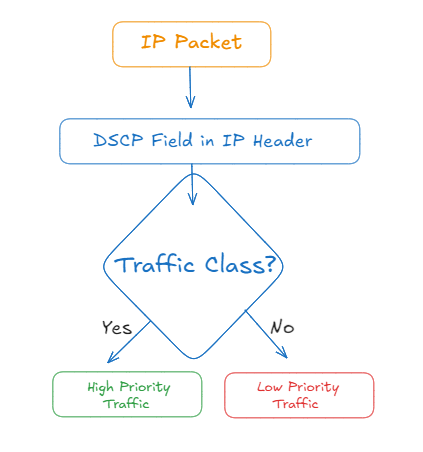
PowerScale’s OneFS 9.9 release now supports CoS and QoS tagging. This feature adds the Differentiated Service Code Point (DSCP) setting, which allows you to configure Cost of Service (CoS) and Quality of Service (QoS) values on outgoing IP packets.
CoS and QoS Tagging Explained:
CoS (Class of Service) Tagging: CoS is a way of managing traffic by grouping similar types of traffic together and treating them with the same level of service. In networking, CoS is used to prioritize traffic at the data link layer. This is typically done by tagging Ethernet frames with a priority level, which network devices can then use to determine how to handle the traffic.
QoS (Quality of Service) Tagging: QoS is a broader concept that includes mechanisms to control and manage network resources by setting priorities for specific types of data on the network. QoS operates at the network layer and can ensure that critical applications get the necessary bandwidth and low latency they require, while less critical applications are given lower priority.
How CoS/QoS Tagging Improves Performance for PowerScale:
- Traffic Prioritization:
- By tagging different types of traffic (transactional data, network management, bulk data, best effort), PowerScale can prioritize critical traffic over less critical traffic. For instance, real-time applications like AI inferencing can be given higher priority, ensuring they receive the necessary resources to operate efficiently without being affected by less critical traffic.
- Reduced Latency:
- QoS can reduce latency for high-priority traffic by ensuring that these packets are processed faster than others. This is particularly important for applications requiring real-time data processing, such as AI training and inferencing.
- Enhanced Bandwidth Management:
- With QoS tagging, bandwidth can be allocated more efficiently. High-priority traffic can be guaranteed a certain amount of bandwidth, preventing congestion and ensuring smooth operation of critical applications.
- Improved Reliability:
- By ensuring that critical network traffic is prioritized and managed effectively, the overall reliability of the network is improved. This means that PowerScale systems can maintain high performance even under heavy load conditions.
- Consistent Performance:
- CoS/QoS tagging helps in maintaining consistent performance by avoiding scenarios where less critical traffic affects the performance of high-priority applications. This ensures that essential services always receive the required resources.
Implementation in PowerScale:
Configuration: PowerScale allows administrators to configure DSCP (Differentiated Services Code Point) values for different types of network traffic. This configuration can be done using the CLI or WebUI, and it ensures that the DSCP values are consistent across the cluster and preserved through upgrades.
Operational Example:
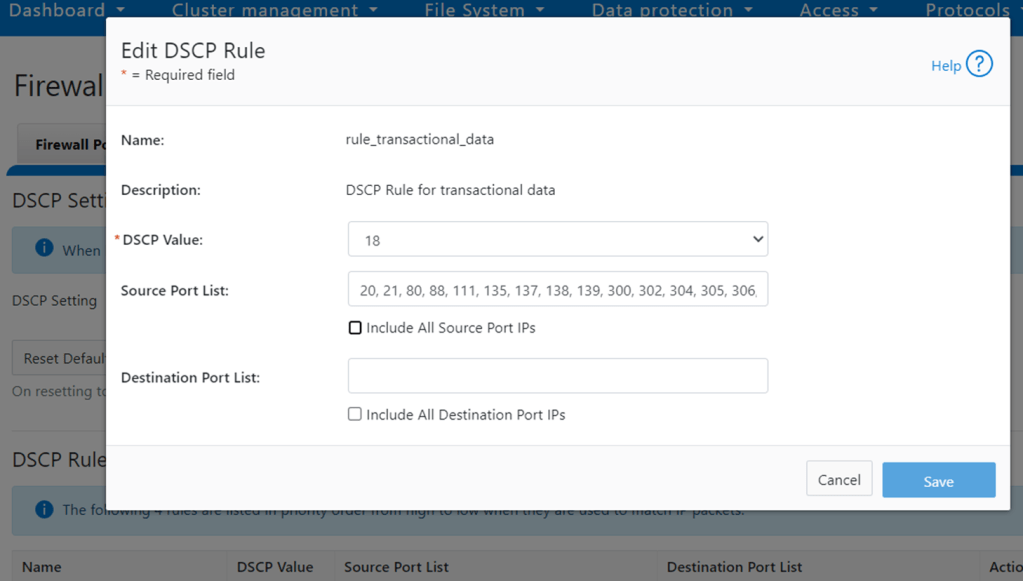
- Transactional Data (e.g., SMB/NFS/HDFS): Can be tagged with a higher DSCP value (e.g., 18) to ensure low latency and high priority.
- Network Management (e.g., WebUI, SSH, SNMP): Can be tagged with a DSCP value of 16.
- Bulk Data (e.g., Data Mover, SyncIQ, Backup): Can be tagged with a DSCP value of 10.
- Best Effort Traffic: Tagged with a DSCP value of 0, indicating the lowest priority.
When IP packets are outgoing at frontend ports of the cluster, they will be matched to the above 4 rules one by one from top to bottom. If a good match is found based on source or destination ports, firewall engine will mark their DSCP bits as specified by that rule. The last “Best Effort” rule will catch all outgoing IP packets which are not matched with the above 3 DSCP rules.
note: All the above CoS/QoS tag functionality works on external network including management interface and frontend I/O. Internal or backend network traffic will not be affected.
- Host-based Firewall feature must be enabled before this feature is functional.
- This feature can be enabled or disabled per the cluster.
Click “Edit Rule”
Commands for Configuration:
View Firewall & DSCP Status
isi network firewall settings viewEnable/Disable CoS Tagging
isi network firewall settings modify --dscp-enabled <true|false>Display All DSCP Rules
isi network firewall dscp listModify DSCP Rules
isi network firewall dscp modify <rule_name> --dscp-value <int> --src-ports <ports...> --dst-ports <ports...>Reset DSCP Settings
isi network firewall reset-dscp-setting
After configuring DSCP values on the PowerScale array, you will need to configure your network switches to recognize and act upon these DSCP markings. This typically involves configuring Quality of Service (QoS) policies on the switches 🙂
Optimizing PowerScale for AI Workloads: Insights from Network Challenges
The emergence of generative AI and its demanding workloads has brought to light the limitations of traditional network fabrics. As the blog on optimizing data center fabrics for AI highlights, monolithic, long-lived flows and many-to-many communication patterns inherent to AI training and inferencing can strain even the most robust networks. These challenges underscore the importance of holistic infrastructure optimization.
Prioritization Beyond Basics: While PowerScale’s CoS/QoS allows for traffic prioritization, AI’s unique traffic patterns require a more nuanced approach. Considering AI-specific traffic classes and assigning them appropriate DSCP values can significantly improve performance.
Optimizing Data Center Fabrics for Generative AI Workloads
Martin Hayes Blog discusses the challenges traditional data center networks face when handling the unique demands of Generative AI (Gen-AI) workloads. It highlights that Gen-AI’s traffic patterns, characterized by monolithic, long-lived flows, and extensive many-to-many communication, can lead to congestion and performance bottlenecks in conventional Ethernet fabrics – It well worth a read for engineering facing these challenges and design decisions. Key points include;
Key Takeaways from Martin’s Blog:
- Rethink ECMP: AI’s monolithic flows can overwhelm ECMP. Explore alternative load-balancing mechanisms.
- AI-Specific Prioritization: Consider AI-specific traffic classes and assign appropriate DSCP values.
- Holistic Network Optimization: Integrate PowerScale’s CoS/QoS with broader network enhancements.
- Monitoring and Adaptation: Continuously monitor and adapt CoS/QoS configurations for optimal AI performance.
Holistic Network Optimization
PowerScale’s CoS/QoS implementation should be seen as part of a larger strategy that includes network fabric enhancements, architectural techniques, and source-level intelligence.
Monitoring and Adaptation: AI workloads are dynamic and evolving. Continuous monitoring of network performance and adapting PowerScale’s CoS/QoS configurations accordingly will be crucial for maintaining optimal performance.
Conclusion:
While PowerScale’s CoS/QoS tagging offers a solid foundation for performance optimization, the challenges posed by AI workloads necessitate a more comprehensive approach. By incorporating insights from Martins blog, we can refine PowerScale’s CoS/QoS implementation and ensure it’s fully equipped to handle the unique demands of AI. Remember, optimal AI performance requires a holistic strategy that addresses both storage and network optimization. By bridging these two domains, we can unlock the full potential of PowerScale in the AI era.
Additional Considerations:
Exploring AI-specific network protocols and technologies like RoCE v2 will further enhance PowerScale’s performance in AI environments you can learn more about implementing RDMA on PowerScale here and here
 All things Unstructured Data
Leave a comment